
Why AI Content Operations Need Workflow Before & Not After
43% of content teams don’t have standardized workflows. Here’s why that number exists, and how to become the exception.
Your team just shipped AI content generation. You’re pumping out 5x more blog posts. Compliance is a nightmare. Nothing gets published on schedule. Writers are rewriting everything.
You added a tool. But you didn’t add a system.
This is the content operations problem of 2026. CMOs and founders are racing to adopt AI—to scale, to move fast, to compete. What they’re not doing is building the workflows that make AI useful instead of chaotic. The result is more content, more versions, more delays, and more frustrated teams.
The math is simple: AI without workflow structure produces expensive noise. Workflow without AI produces slow motion. But workflow first, then AI, produces the only thing that matters: predictable, compliant, revenue-driving content at scale.
43% of content teams describe their workflows as unstructured, with manual handoffs and no clear standardization. The other 57% are either lying or ruthless about process.
This post is a working blueprint. By the end, you’ll know exactly what workflows to build, when to build them, and where AI actually belongs in the sequence. You’ll also know why every consultant who told you to “implement AI first” was wrong.
The Core Problem: Tools Don’t Replace Structure
Here’s what happens when teams skip the workflow phase:
- Writer uses AI to draft. Editor doesn’t know. They edit the file, save a new version, email it back.
- Writer gets 3 versions, merges them manually, uploads to a different tool because “that’s where the final version lives.”
- Compliance team doesn’t see it until it’s scheduled. Feedback comes too late. Content gets pulled. Launch delays.
- Next piece, same chaos. No learning. No speed improvement.
This is not an AI problem. This is an operations problem wearing an AI costume.
A workflow defines four things clearly
- who does what,
- in what order,
- where it lives,
- and what done looks like.
AI tools are inputs to workflows. They are not workflows themselves. Add a workflow first. Then add AI into the steps where it saves time.
The difference:
|
Without workflow AI draft → email chaos → manual merging → missed reviews → pulled content |
With workflow AI draft → shared doc → review stage → approval step → auto-published |
Why This Matters for CMOs and Founders Right Now
You’re under pressure on two fronts. Your CEO wants more content, faster, cheaper. Your team says they’re drowning. Both are true!
Adding AI without workflows doesn’t solve this. It amplifies it. You now have an AI tool that your team doesn’t know how to use, creating content that doesn’t go through review, landing in an inbox instead of a system, getting lost between three different drives. The teams winning in 2026 are not the ones with the fanciest AI tools. They’re the ones with the tightest workflows.
They have:
- One source of truth for every piece (not email, not Slack, not three Google Docs)
- Clear stages where work stops for review or approval (before it’s too late to fix)
- Automated handoffs (no one forgets to notify SEO, no draft gets published by mistake)
- Visible status (a CMO can ask “where’s the post” and get a real answer, not a shrug)
These teams move faster. They publish more. They have fewer rework cycles. And their AI tools actually work because the AI has clear inputs and clear next steps.
Only 32% of content teams can update content across channels the same day. That’s not a bandwidth problem. That’s a workflow problem. There’s no single system telling everyone what needs updating and when.
What Broken Workflows Cost You
Let’s cost this out in actual time. Take a single blog post for a B2B SaaS company:
- Idea sits in email for 3 days. Writer doesn’t see it. (3 hours lost scheduling time)
- Writer drafts in Google Docs. Sends link via email. Editor has 2 other versions open. Merges manually. (2 hours)
- Content manager doesn’t know a final version exists. Publishes an earlier draft by mistake. (1 hour recovery + 4 hours reputation damage)
- SEO team wasn’t briefed. Keyword research was wasted. Post ranks poorly. (8 hours of failed work)
- Total: 18 hours for one post. Multiply by 12 posts a month. That’s over 200 hours of pure waste per month.
With a workflow in place, that same post takes 6 hours of actual work time (drafting, editing, approvals). The other 12 hours vanishes. That’s not a productivity boost. That’s the difference between drowning and moving.
The Three Workflows Every Content Team Needs
You don’t need 50 workflows. You need three. They cover 90% of content production.
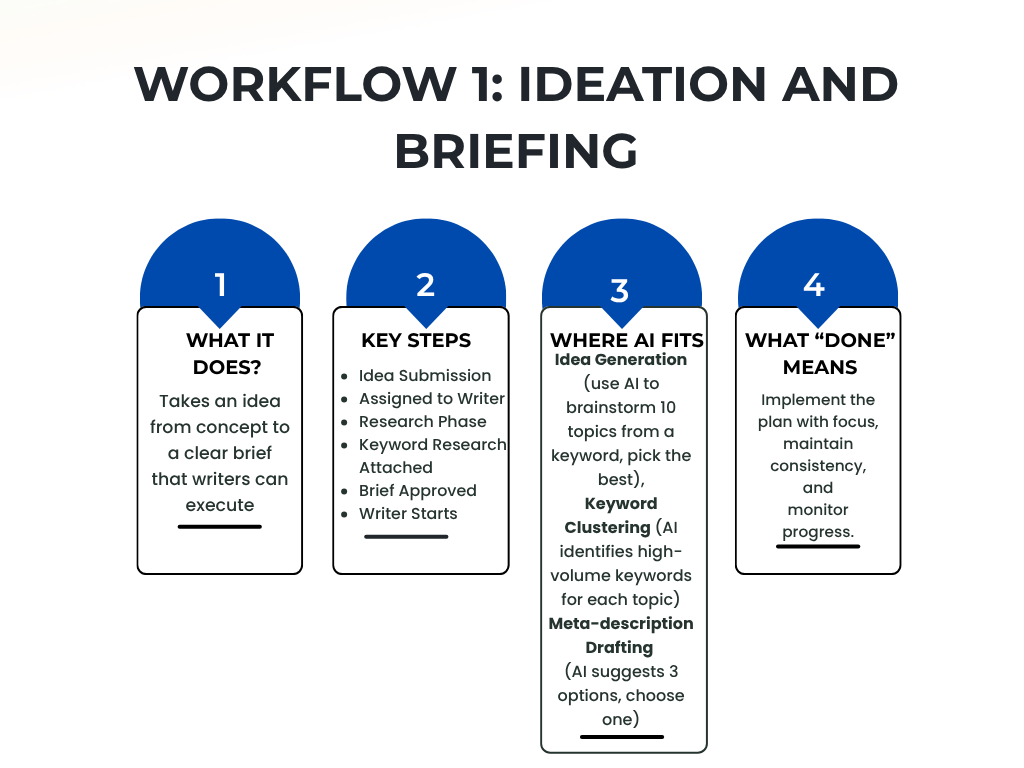
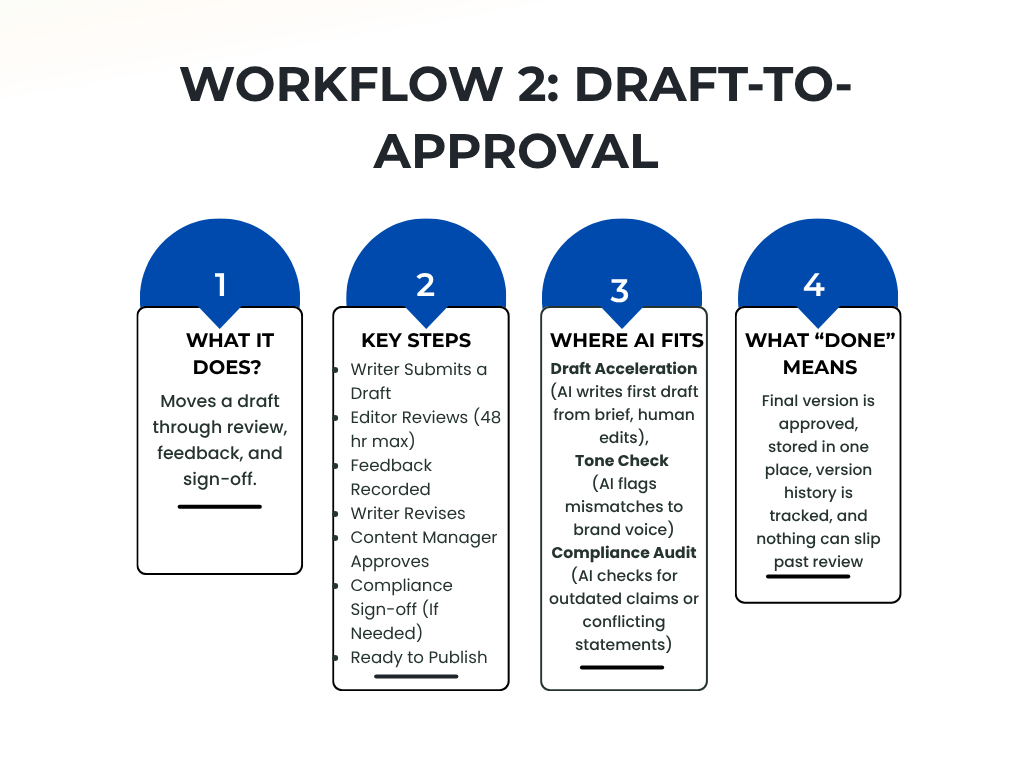
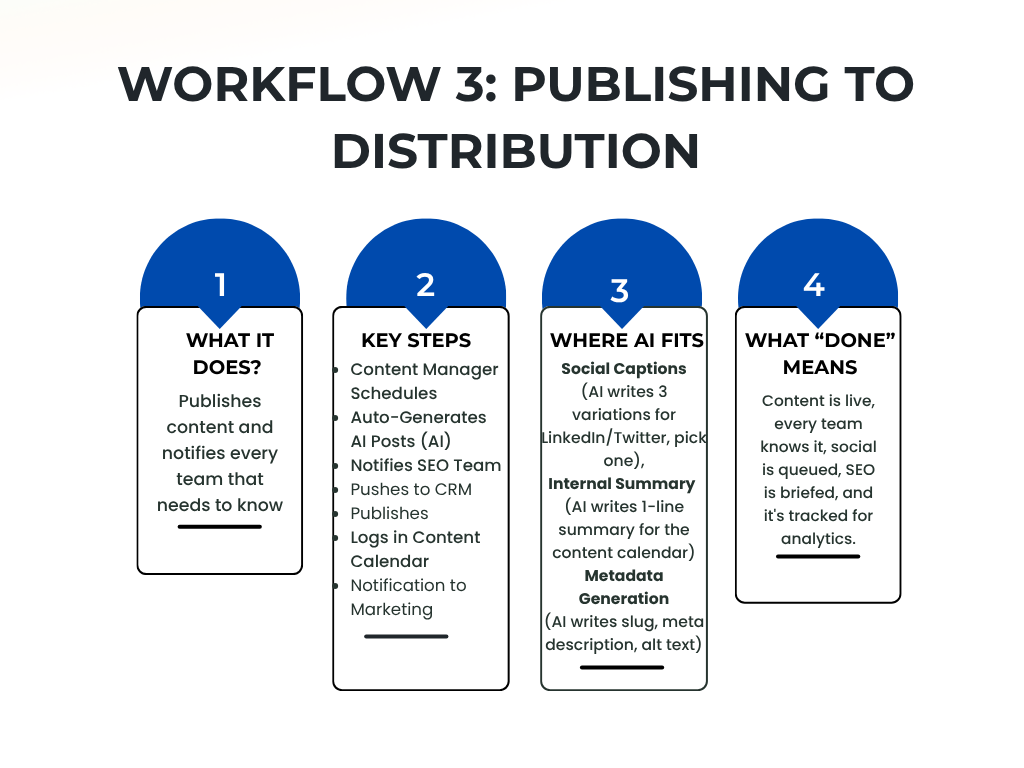
How to Build These Workflows: The Framework
Building workflows doesn’t mean hiring consultants or buying enterprise software. It means defining four things for each workflow step:
- Owner: Who is responsible for this step? (Writer, Editor, Content Manager, etc.)
- Input: What does this step receive? (A brief, a draft, a final post)
- Action: What does the owner do? (Write, edit, approve, publish)
- Output: What’s the deliverable? (A draft, an approval, a published post)
Write this down. Share it. Make it boring. The best workflows feel obvious once they’re written down.
Complete Ideation Workflow
Here’s what this looks like in practice for the ideation workflow:
Step 1: Idea Submission
Owner: CMO or content strategist
Input: None (starting point)
Action: Fill out brief template with topic, target audience, primary keyword, business goal
Output: Filled template saved in shared folder (not email, not Slack)
Step 2: Keyword Research
Owner: SEO specialist
Input: Topic + primary keyword from step 1
Action: Run keyword research, identify 3-5 target keywords, note search volume and intent
Output: Updated template with keywords and search data attached
Step 3: Brief Approval
Owner: Editor or content manager
Input: Completed brief with keywords
Action: Review for clarity, feasibility, alignment with business goals. Mark approved or request changes.
Output: “Approved” status in shared system, writer notified via email with link (not attachment)
Step 4: Ready to Write
Owner: Writer
Input: Approved brief
Action: Writer accesses shared doc, starts draft with outline and keywords visible
Output: Draft in progress, status visible to team (“In progress” or “Submitted for review”)
Where AI Actually Fits
AI should appear at the edges of workflows, not at the center. Use AI to speed up inputs and outputs. Use humans for decisions.
- AI generates 10 topic ideas → Human picks 3 → Brief goes forward
- AI clusters keywords → Human validates groups → SEO specialist uses for outline
- AI writes first draft → Human edits for voice and accuracy → Submitted for review
- AI generates 3 social captions → Human picks one → Published
This is different from “AI writes everything and humans approve.” That’s not a workflow. That’s a rubber stamp. It breaks when AI hallucinates, when compliance catches something, when the brand voice is off.
A real workflow is: AI accelerates, human validates, process ensures nothing breaks.
Only 4% of content teams are “not using AI to impact content volume.” That means 96% are. Most of them have no idea if AI content is actually good. A workflow with review gates catches bad AI output before it ships.
Implementation: 30-Day Roadmap
You don’t build all three workflows at once. Start with one. Master it. Then add the next.
Week 1: Document the Current Chaos
Interview 5 team members. Ask them: How does a piece of content actually move from idea to publish? Write down every step, every tool, every delay. Don’t judge. Just document what’s actually happening (not what you think should happen).
Week 2: Design the Ideation Workflow
Using the chaos map from Week 1, design the ideation workflow. Who owns each step? What tool is the source of truth? What’s the approval gate? Write it down on one page.
Week 3: Implement One Tool as the Center
Pick one tool to be your source of truth for ideation. It could be Airtable, Notion, Asana, or even a Google Sheet. The tool matters less than consistency. Everyone uses the same place, every time. Set up templates so submissions are consistent.
Week 4: Run One Week of Ideation Through the New Workflow
Take 3-5 ideas currently in flight. Move them through the new workflow. Where does it break? What’s confusing? Make small fixes. Celebrate the wins. After 30 days, you have one workflow that works. That’s enough. Add the draft-to-approval workflow next month. Publishing the month after. This is how you avoid building something no one uses.
Common Mistakes (and How to Avoid Them)
1: Building workflows in a tool you don’t own
You document the workflow as a Google Doc, then marketing rotates Google Drive access, and no one can see it. The workflow dies. Use a tool your team actually lives in (Slack, Asana, Notion). Or print it and tape it to the wall. Seriously.
2: Making workflows too detailed
If your workflow is 47 steps long, it will be ignored. Workflows should fit on one page. If it doesn’t, you have too many workflows or each workflow is doing too many things. Split it.
3: Not making the workflow visible
A workflow no one sees is a workflow no one follows. Make status visible. Add a Slack notification when something moves to the next step. Use a public dashboard or kanban board. Visibility breeds compliance.
4: Forgetting to build review gates
Without approval steps, AI content ships with errors. Compliance misses things. Brand voice gets mangled. A workflow without review gates is just organized chaos. Budget 2-3 approval steps per workflow.
5: Assuming everyone already does this
They don’t. Even the people who designed the workflow need a reminder email in their first week. Be okay with that. Send the reminder. Make it normal.
The Real ROI of Workflows
This isn’t theoretical. Here’s what teams report after 60 days of following a workflow:
- 40% reduction in rework (fewer “can you re-edit this” emails)
- 30% faster time-to-publish (fewer delays waiting for feedback)
- Zero compliance surprises (everything reviewed before it’s live)
- 50% less Slack-based project management (one source of truth instead of five)
- AI tools that actually work (because they have clear inputs and human validation)
Scale this across 100 posts a year, and you’re recovering thousands of hours. That’s not efficiency drama but real revenue.
The Bottom Line
Your team doesn’t need faster tools. They need a system that works. Build the workflows first. Then add AI into the places where it saves the most time and causes the least risk.
The teams shipping content reliably in 2026 are not the ones with the newest AI. They’re the ones with workflows so clear that a new hire can follow them in their first week.
Start there. Build one workflow. Document it. Live it. Then add the next.
Build your content operations framework
Writopia Analytics helps B2B teams design and scale workflows that actually work. We audit your current process, identify bottlenecks, and build the system your team can follow.